 Airlock
Hold Alt, tap Tab.
Workspace-isolated Alt+Tab for COSMIC
The switcher lists and cycles only the windows on the current workspace, so nothing you parked elsewhere leaks into your focus.
curl -fsSL https://raw.githubusercontent.com/l1br3-io/cosmic-ext-airlock/main/scripts/install.sh | shOne command: downloads the prebuilt x86_64 binary, verifies its sha256, and runs the setup. Needs a COSMIC desktop session: no Rust, no sudo, no shell rc edits. What the installer writes, and how to undo it.
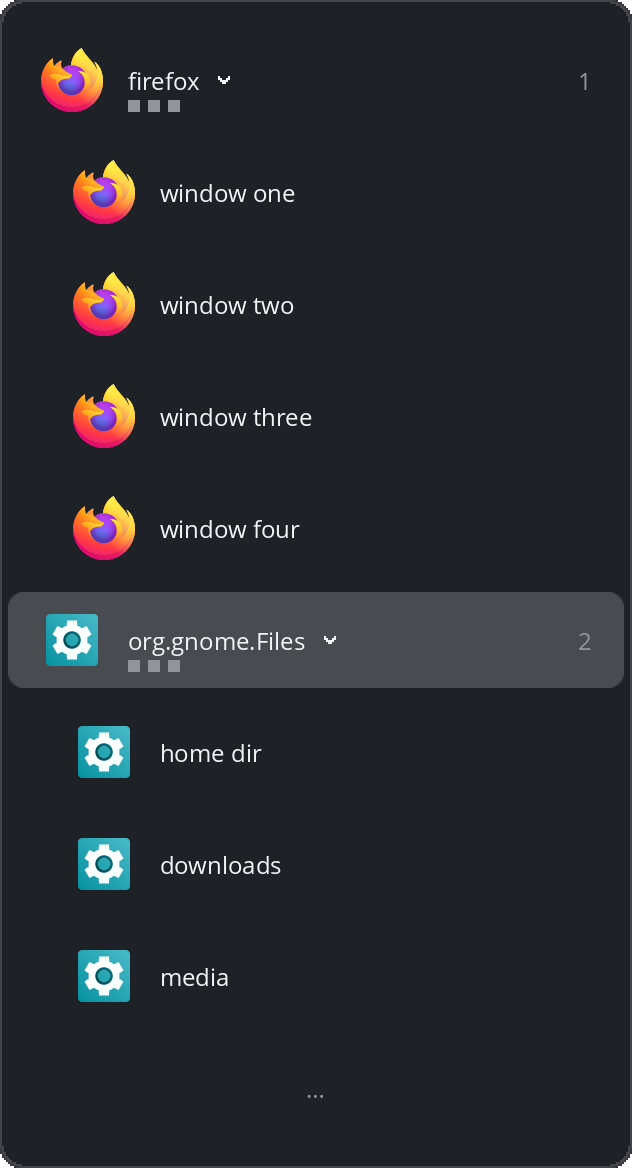
grouping = true).Demo
The whole walkthrough, five minutes on a real COSMIC desktop: hold Alt, tap Tab, type to filter, close from the card.
Why not the built-in switcher
The built-in switcher
Lists every window on every workspace, most recently used first; the request for a workspace filter (pop-os/cosmic-epoch#1777) is still open.
Airlock
Airlock is that filter as a standalone app, with no compositor
patch; airlock install --uninstall restores the
built-in switcher.
The cost
The switcher path Airlock replaces (cosmic-launcher's cosmic-switch-less) measured about 170 MB RSS. Airlock's daemon: 8.0 MB (see Performance).
Features
Hold Alt, tap Tab: an overlay lists the current workspace's windows, most recently used first — each row its application's themed icon beside its title. Release Alt to switch; Enter confirms without releasing; Escape dismisses; a tap released before the overlay appears still switches.
What the list shows
- Workspace isolation — plain Alt+Tab reaches only the current workspace's windows; a workspace can opt into the global list (Settings)
- All-windows mode — Alt+Esc opens the same card over every workspace's windows, grouped by workspace with yours first; Alt+Shift+Esc steps it backwards
- Type to filter — while the card is up, typing narrows it by title or app name, case-insensitive; works in every mode
- Workspace label —
show_workspace = truenames the workspace you pressed on, the anchor for workspaces opted out of isolation
Sticky windows appear on every workspace; minimized windows nowhere; one Alt+Esc press reaches any window regardless of the rules.
Choosing and closing
- Direct access — Ctrl+N (1–9, keypad included) switches to the Nth window at once, like a click; each row shows its digit
- App cycling — Alt+` (the key above Tab) cycles the current application's windows; Alt+Shift+` steps backwards
- Quick-toggle —
airlock quick-toggleflips to the second-most-recent window without an overlay; no default key — bind it in Settings → Input → Keyboard → Shortcuts → Custom - Close from the card — Alt+- closes the selected row's window and the card stays up; hovering a row reveals a × badge that closes on click
- Pointer input — hover moves the selection, click switches, the wheel steps; the pointing-hand cursor marks every click target
Layout and appearance
- App grouping — the list becomes a per-app tree: collapsed app entries commit their most recently used window, → expands one and ← collapses it; on the horizontal band the selected tile opens its run in place
- Horizontal layout —
layout = "horizontal"lays the same list out as a wide strip of icon-only tiles under one caption naming what release would activate - Card sizing — a long list never grows the
card (
rowsstay in view, 8 by default,…marking the truncated edges);columnsandwidth/min-widthfit the strip to the screen - Fonts — titles render in the desktop's
interface font, accents, CJK and emoji included, at 12 logical px
by default;
fontandfont_sizeoverride
Every key, pointer rule, the frozen-list rule, and the card's measurements: how the switcher behaves.
Performance
Measured on hardware on 2026-11-02 (method: hardware checklist).
| Measurement | Target | Airlock |
|---|---|---|
| Daemon RSS / threads | < 30 MB | 8.0 MB / 1 thread |
| Warm press round-trip | < 50 ms | < 10 ms |
| Cold press (respawn + settle) | n/a | ~340 ms |
Install
curl -fsSL https://raw.githubusercontent.com/l1br3-io/cosmic-ext-airlock/main/scripts/install.sh | shRequires a COSMIC Epoch desktop session. The script downloads the
prebuilt x86_64 binary, verifies its sha256, installs it into a
directory on your PATH, and runs
airlock install, with no sudo. The keybinds hold the
binary's absolute path, so the switcher works the moment install
finishes. If that directory is not on PATH, it
appends an export line to ~/.bashrc and
~/.profile (zsh: ~/.zshrc; fish: it
prints the fish_add_path line) so typing
airlock in a new terminal works. To read it
first, save the file, inspect it, then run it; with
AIRLOCK_NO_INTEGRATION=1 it installs the binary alone,
and AIRLOCK_NO_MODIFY_PATH=1 prints the PATH line
instead of appending it.
With cargo
cargo binstall cosmic-ext-airlock downloads the
prebuilt binary (cargo-binstall itself:
cargo install cargo-binstall); the prebuilt archive
needs none of the packages below. cargo install
cosmic-ext-airlock (Rust 1.93+) compiles, and does need
them.
Build dependencies
cargo install compiles and cannot install system
libraries: the build needs a C toolchain, pkg-config, and the
Wayland/xkbcommon headers. On Pop!_OS:
sudo apt install build-essential pkg-config libwayland-dev
            libxkbcommon-dev
. From a checkout, just install
checks these and installs only the missing ones for you.
What airlock install writes
The complete setup: keybind takeover, app icon, desktop entry, commented starter config — all user-level. A key already bound to one of your own shortcuts is skipped and named in the output.
Undo
airlock install --uninstall— restores the built-in switcher byte-for-byte, and removes the app icon, desktop entry, and unedited starter config.- Remove the binary:
rm ~/.local/bin/airlockif the installer put it there, orcargo uninstall cosmic-ext-airlockif cargo did. - On another compositor, the daemon exits with a diagnostic naming the missing protocol.